Target existing elements
Attach haptics to buttons, links, menus, or notices using CSS selectors like .buy-now or #checkout.
WordPress Plugin
Haptic Vibrate adds subtle tactile feedback to buttons, links, notices, menus, and custom interactions — without rebuilding your front end. Configure it once, and your interface feels more alive on supported devices.
Why people install it
The plugin is built for site owners, builders, and product teams who want a more responsive mobile feel. Target existing UI with selectors, reuse generated classes in templates, and test everything safely on desktop.
Attach haptics to buttons, links, menus, or notices using CSS selectors like .buy-now or #checkout.
Every rule generates a class name you can drop into blocks, templates, snippets, or custom HTML without repeating setup.
Choose from light taps, notifications, success pulses, warnings, errors, or enter your own millisecond pattern.
When vibration isn’t available, a visual ripple and short audio cue help you test the exact interaction flow from your browser.
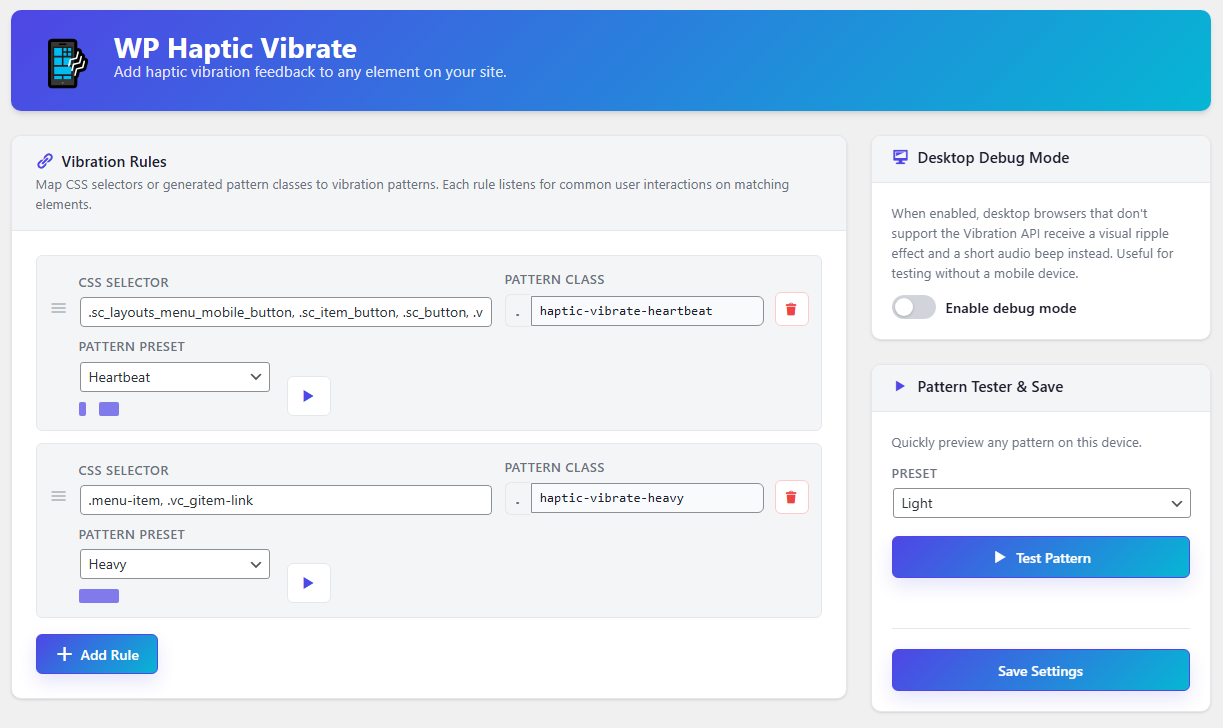
This is the actual WordPress admin interface used to configure rules and test patterns.
The workflow stays simple even when your front end is not.
.buy-now, .menu-link, or .notice-action.Custom… for your own timing sequence.Live demo
Below is a simplified preview of the actual settings logic: one example rule, a generated class, a tester, and a small sandbox showing where that rule would fire on a front end.
A buyer-friendly version of one rule from the real settings screen.
This is intentionally smaller than the full admin page — enough to show how setup works without turning the landing into a control panel.
Tap the sample elements below to see where the current rule would apply.
Reusable markup example
<button class="haptic-vibrate-success cta-button">Buy now</button>